- Read-endpoint pagination
Mercura API (1.79.2)
Mercura is an AI-powered platform for processing inquiries — bills of materials, tenders, RFQs — in wholesale distribution, manufacturing, and technical sales. The Mercura API is the integration surface your organisation uses to plug Mercura into the rest of your software landscape.
The API is bidirectional by design:
- Master data flows in — your articles, customers, and suppliers are pushed into Mercura so that incoming inquiries can be processed against them.
- Structured offers flow out — each inquiry, once Mercura has read the LV, captured the positions, and matched each one to an article from your catalogue, is returned as a fully structured offer ready for your downstream system to pick up.
The source system on your side does not have to be a specific ERP. Any system that owns master data — an ERP, a PIM, a custom catalogue, a spreadsheet export pipeline — can be the integration partner.
The end-to-end flow is four steps:
- Push master data.
POST /articles,POST /customers, andPOST /suppliersaccept bulk payloads of up to 100,000 rows and 200 MiB each and return aJobAckimmediately. A few large requests are preferred over many small ones; for rich articles see Jobs → Request size. - Get notified when the jobs finish. Each
POSTreturns ajob_id. The recommended path is a webhook: register a subscription once (admin UI, see Webhooks below) and Mercura delivers a signedjob.finishedevent to your endpoint as soon as the job reaches a terminal state. If a webhook receiver is not an option, fall back to pollingGET /jobs/{job_id}. - Read completed tenders and orders back. This is the payoff. A
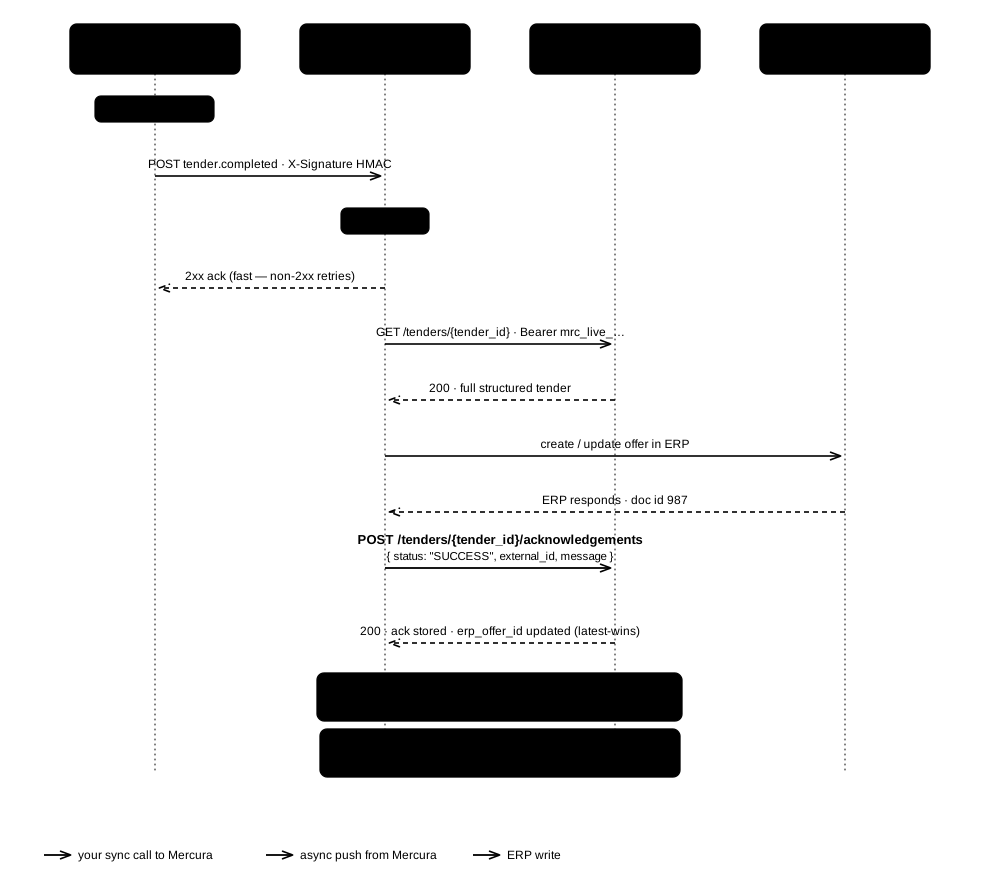
tender.completed(ororder.completed) webhook fires the moment a Mercura user releases a record to your system (the Finalize / Export → API action) — your endpoint then callsGET /tenders/{tender_id}(orGET /orders/{order_id}) to pull the full structured record (positions, matched articles, quantities, prices, totals).GET /tenders/GET /ordersare the cursor-paginated list views for catch-up scans; pass?completed_since=…for the completion feed. - Acknowledge the import. Once the record is committed to your ERP/CRM,
POST /tenders/{tender_id}/acknowledgements(or/orders/{order_id}/acknowledgements) withstatus: "SUCCESS"and your ERP document id inexternal_id— Mercura stores it on the record'serp_offer_id(latest-wins) and surfaces the outcome in the app. Reportstatus: "FAILED"with amessagewhen the import is rejected.
A typical integration runs step 1 nightly (delta-sync new and changed master-data rows) and reacts to tender.completed / order.completed webhooks in step 3 to drive new offers into the downstream system in real-time, acknowledging each import in step 4.
Steps 3–4 above can be driven two ways. Webhook (push) is the recommended path — Mercura notifies your endpoint the instant a tender or order completes, so you react in real time. Polling (pull) is the fallback when your side cannot expose an inbound HTTPS endpoint — you scan the completion feed on a schedule. Both end the same way: fetch the full record, write it to your ERP/CRM, and acknowledge the import.
The sequences below show the tender flow. Orders are identical — swap tender.completed → order.completed, GET /tenders/{id} → GET /orders/{id}, and the acknowledgements path.
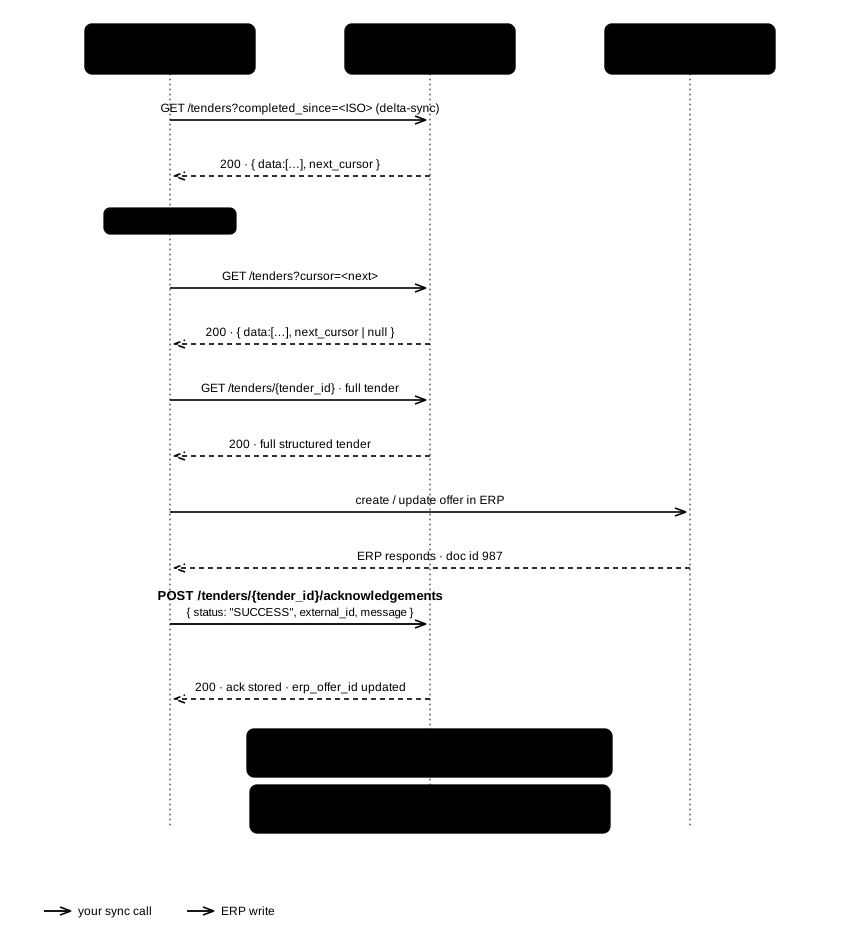
Poll ?completed_since=… on a schedule (every few minutes is typical). completed_at refreshes on every completion, so a re-exported tender reappears in the feed — key off tender_id and keep your ERP writes idempotent. Keep completed_since on every request; once you hold a next_cursor, send only the cursor.
If you would rather not poll, Mercura can push events to an HTTPS endpoint on your side as soon as something happens — a job.finished event replaces the polling loop above, and a tender.completed / order.completed event tells you the moment a record has been released to your system (see Integration patterns: webhook vs polling above for the full push-vs-pull sequence).
Subscriptions are set up by an org admin in the Mercura web app under Settings → Integrations → For developers → Webhooks — there are no /webhook_subscriptions endpoints in this API. Once a subscription exists, the wire format, HMAC-SHA256 signature recipe, retry schedule, and example payloads are documented in the Webhooks chapter further down.
The API uses bearer tokens issued in the Mercura admin UI under Settings → Integrations → For developers → API.
Authorization: Bearer mrc_live_<token>Missing, malformed, expired, or revoked tokens return 401 UNAUTHORIZED.
Six steps, one terminal, no SDK. By the end you will have pushed an article into your catalogue, watched the ingestion job finish, received a signed event the moment a tender was released, fetched the full structured record, and acknowledged it — the exact loop a production integration runs, at the smallest possible scale.
Steps 1–3 are plain curl. Step 4 registers a webhook, and that is the step that defines the shape of your integration — Mercura pushes, you react. Polling exists as a fallback and as a reconciliation sweep, not as the main road.
Every step states the checkpoint that tells you it worked, so you always know whether to continue or to stop and fix something.
| An API key | Mercura app → Settings → Integrations → For developers → API. It looks like mrc_live_… and is shown once — store it in your secret manager. |
| The base URL | https://prod-euapi.mercura.ai/api/public/v1 |
| An HTTPS endpoint | For step 4 — reachable from the internet, able to answer 2xx quickly. A tunnel to your laptop is fine while you are trying this out. No endpoint possible? Step 4 shows the polling fallback. |
| One completed tender | For steps 5–6. A Mercura user releases a tender with Finalize / Export → API; until that has happened at least once, there is nothing to fetch. |
Set the two values once, so every command below is copy-paste ready:
export MERCURA_API="https://prod-euapi.mercura.ai/api/public/v1"
export MERCURA_KEY="mrc_live_..."This documentation site runs a mock server that answers the operations in this reference with the example payloads shown on each page. It accepts any API key and stores nothing, so you can build your client before your organisation has issued a key, or point automated tests at it that must never reach production. Swap the base URL and every command in this Quickstart runs unchanged:
export MERCURA_API="https://docs.mercura.ai/_mock/openapi"
curl -sS "$MERCURA_API/articles"
The Try it console in this reference has the mock server preselected. Know its limits before you rely on it:
- Responses are the documented examples, not your data.
GET /articles/{article_number}returns the same example article for any number, and aPOSTreturns a fixedjob_idwithout storing anything. The checkpoints below describe the real API, so they will not match the mock. - Only path and query parameters are checked. A missing required parameter or a wrong type is rejected; a request body is not validated, so a malformed body still gets the success example.
- No webhooks. The mock never calls your endpoint.
Switch MERCURA_API back to the production base URL when you have a key.
Master data goes in first — it is the catalogue that incoming inquiry positions are matched against. The real sync sends thousands of rows per request (see Jobs → Request size); here we send one.
curl -sS -X POST "$MERCURA_API/articles" \
  -H "Authorization: Bearer $MERCURA_KEY" \
  -H "Content-Type: application/json" \
  -H "Idempotency-Key: quickstart-articles-1" \
  -d '{
        "articles": [
          {
            "article_number": "QS-1001",
            "name": "Ball valve DN25, brass, PN16",
            "manufacturer": "Acme",
            "manufacturer_article_number": "AC-25-BR",
            "ean_number": "4012345678901",
            "unit": "PCE",
            "list_price": "48.90",
            "custom_attributes": { "erp_material_group": "A150" }
          }
        ]
      }'
{ "job_id": "4242", "status_url": "/api/public/v1/jobs/4242" }Checkpoint: 202 Accepted and a job_id. Nothing has been written to the catalogue yet — every write in this API is asynchronous.
Run the exact same command a second time: you get
200 OKand the samejob_id, because theIdempotency-Keymatched — no second job runs. That is what makes retrying after a timeout or a dropped connection safe. It also means the replay reports the original job's outcome: if that jobFAILED, so does the replay. Fix the cause, then send the batch again under a new key.
curl -sS "$MERCURA_API/jobs/4242" \
  -H "Authorization: Bearer $MERCURA_KEY"
{
"job_id": "4242",
"entity": "ARTICLES",
"status": "COMPLETED",
"total_rows": 1,
"created_count": 1,
"updated_count": 0,
"error_count": 0,
"errors": []
}Checkpoint: status is COMPLETED and error_count is 0.
Two things to internalise here, because they shape your whole client:
COMPLETEDwitherror_count > 0is partial success — those rows are listed inerrors[]with theirrow_numberandidentifier, the rest were applied. OnlyFAILEDmeans nothing landed, anderror_messagesays why (for example a tag name that does not exist in Mercura).- Poll every second for the first 30 seconds, then back off to 5–10 seconds. Do not impose a wall-clock timeout — a 100k-row catalogue sync legitimately takes minutes. See the Jobs chapter.
Once you have the webhook receiver from step 4 running, subscribe it to job.finished as well and this polling loop disappears too — the same push-instead-of-poll principle applies to both directions.
curl -sS "$MERCURA_API/articles/QS-1001" \
  -H "Authorization: Bearer $MERCURA_KEY"
Checkpoint: 200 OK, and the row carries what you sent — including your custom_attributes. The article's public id is your article_number: the identifier you assign stays the identifier you address it by, in both directions, forever.
Mercura tells you when a tender is ready; you do not go looking for it. This is the recommended integration pattern, and it is worth wiring up before you write any ERP code, because everything after this point is a reaction to it.
Register a subscription in the Mercura app under Settings → Integrations → For developers → Webhooks, subscribe to tender.completed, and store the signing secret it gives you. Then fire the webhook.test event from the same screen to prove your receiver is reachable before real events depend on it.
Your receiver has three jobs:
- Verify
Mercura-Signature-256against the raw request bytes — before trusting anything in the payload. The HMAC-SHA256 recipe and a ready-made verifier are in the Webhooks chapter. - Deduplicate on
Mercura-Event-Id. It is stable across retries; the same event may legitimately arrive twice. - Answer
2xxfast, then do the ERP work asynchronously. A5xxor a timeout puts the delivery on the retry curve.
Checkpoint: webhook.test arrives at your endpoint and its signature verifies. From here on, a Mercura user hitting Finalize / Export → API delivers you a tender.completed event:
{
  "event_id": "7e8f4a3b-9c1d-4a2b-9d1c-2e3f4a5b6c7d",
  "event_type": "tender.completed",
  "delivered_at": "2026-07-09T12:00:00Z",
  "data": {
    "tender_id": 12345,
    "name": "RFQ-2026-0042 — Office Tower B",
    "position_count": 47,
    "completed_at": "2026-07-09T11:59:58Z"
  }
}
The payload is deliberately small — it tells you which tender changed, not what is in it. Take data.tender_id into step 5.
If you cannot expose an inbound HTTPS endpoint, poll the completion feed instead — same trigger, minutes later instead of seconds:
curl -sS "$MERCURA_API/tenders?completed_since=2026-01-01T00:00:00Z" \
  -H "Authorization: Bearer $MERCURA_KEY"
Each item in
data[]is already a full tender, so you can skip step 5;next_cursorpages through the rest.
Run that same feed as a nightly reconciliation sweep even once webhooks are live. Push plus reconcile is what survives an outage on either side — it is not redundancy you can skip.
curl -sS "$MERCURA_API/tenders/12345" \
  -H "Authorization: Bearer $MERCURA_KEY"
Checkpoint: you get chapters[] → positions[] with article_number, quantity, unit, net_price, line_net, plus totals. That structure is what you map into an ERP offer.
Always fetch the current state rather than trusting a cached copy — the webhook is a notification, not a snapshot. Three things that save you a bug later:
net_totalis the authoritative amount, notpositions_subtotal— the subtotal is a derived helper that excludes alternatives and Bedarfspositionen, whilenet_totalmatches the PDF the customer sees.positions[].idis opaque. Use it as the handle when you edit a line; never derive it from the position number.customer_idandproject_idare references only. Resolve them viaGET /customers/{customer_id}andGET /projects/{project_id}.
Close the loop: tell Mercura what your ERP did with the offer, so the operator sees the outcome in the app instead of asking you.
curl -sS -X POST "$MERCURA_API/tenders/12345/acknowledgements" \
  -H "Authorization: Bearer $MERCURA_KEY" \
  -H "Content-Type: application/json" \
  -d '{ "status": "SUCCESS", "external_id": "SO-2026-5567" }'
Checkpoint: 200 OK with the recorded acknowledgement. Your external_id is written to the tender's erp_offer_id and shows up everywhere Mercura reads that field.
When the import is rejected, report it — message is required in that case and is what the operator reads:
curl -sS -X POST "$MERCURA_API/tenders/12345/acknowledgements" \
  -H "Authorization: Bearer $MERCURA_KEY" \
  -H "Content-Type: application/json" \
  -d '{ "status": "FAILED", "message": "ERP rejected customer KFR003 (credit hold)" }'
You now have the complete loop a production integration runs: master data in, a signed event out, the full record fetched, the outcome reported back.
| If you want to… | Go to |
|---|---|
| Sync a whole catalogue nightly | Jobs — batching, idempotency, per-row errors |
| Pull only what changed | modified_since in Read-endpoint pagination |
| Improve match quality | Articles — the fields that drive matching |
| Correct prices or quantities on a tender | PATCH /tenders/{tender_id} in Tenders |
| Handle failures properly | Errors, Rate limits, and the retry policy in Webhooks |
| Exchange files instead of calling the API | SFTP-based integration at the end of this page |
A few conventions hold across every resource:
- Embedded addresses, standalone contacts. Customer and supplier payloads carry their
addresses[]inline — there is no separate/addressesendpoint, and the wire format hides the internal address table so each parent push is a single snapshot. Contacts, by contrast, are managed via the dedicated/contactsresource and carry their ownparent_type(customerorsupplier) andparent_id, so adding or updating a contact does not require re-sending the entire parent — see the Contacts chapter for the full model and upsert rules. - Stable partner-supplied identifiers.
article_number,customer_id, andsupplier_idare the keys you assign in your source system. They must remain stable across sync cycles — Mercura uses them to upsert: same id → existing row updated; new id → new row created. - Timestamps in ISO-8601 UTC. All timestamps on the wire are ISO-8601 with an explicit
Z(or+00:00) suffix. custom_fieldson every master-data resource. Use it for any source-system field that doesn't fit the standard schema. Mercura preserves the value alongside the row; matching uses it where appropriate.
Every non-2xx response uses one envelope:
{
  "error": {
    "code": "VALIDATION_FAILED",
    "message": "Request validation failed",
    "details": [ { "loc": ["query", "cursor"], "msg": "Invalid cursor", "type": "value_error" } ],
    "request_id": "9a3b...e2"
  }
}
Branch on code — it is stable. message is human-readable and may change between versions. The full list of codes (VALIDATION_FAILED, UNAUTHORIZED, FORBIDDEN, NOT_FOUND, IDEMPOTENCY_KEY_MISMATCH, RATE_LIMITED, INTERNAL_ERROR, …) is documented per endpoint.
The API follows Semantic Versioning (MAJOR.MINOR.PATCH). Only the MAJOR number lives in the URL path (/v1, future /v2, …). The full SemVer string is published in the OpenAPI info.version field and on every response as the X-API-Version header.
| Bump | What it means |
|---|---|
| PATCH | Bugfix / doc fix. OpenAPI shape unchanged. |
| MINOR | Additive only: new optional field, new endpoint, relaxed constraint. Existing clients keep working unchanged. |
| MAJOR | Breaking: removed field, renamed field, narrower constraint. A new URL prefix is published; the previous MAJOR remains available during a migration period. |
Each API key has its own budget. Every request counts as one against the matching limiter — reads draw from the read bucket, writes from the write bucket, and each in-flight bulk-write job holds one concurrency slot. Defaults today:
| Class | Limit |
|---|---|
| Writes (POST) | 60 / minute, burst 10 |
| Reads (GET) | 600 / minute, burst 60 |
| Concurrent in-flight bulk-write jobs | 5 per key |
Every response carries RateLimit-Policy / RateLimit headers (and legacy X-RateLimit-* headers) describing your current budget. On a 429 RATE_LIMITED response, Retry-After tells you how long to wait, and X-RateLimit-Scope tells you whether you hit the per-minute bucket (rate) or the concurrent-jobs cap (concurrency).
Every GET list endpoint — /tenders, /orders, /supplier-requests, /articles, /customers, /suppliers, /projects, and /contacts — is cursor paginated. Pass ?modified_since=<ISO-8601> on the first page to bound the lower edge of the scan by updated_at (useful for delta-sync). Mercura returns a page plus a next_cursor — pass it back as ?cursor=… to get the next page. Once you have a cursor, modified_since is ignored.
On /tenders and /orders you can instead pass ?completed_since=<ISO-8601> to pull the completion feed — only records completed at/after that instant, ordered by completed_at — the reconciliation twin of the tender.completed / order.completed webhooks. Both accept a status filter; /contacts additionally filters by parent_type / parent_id / is_active.
The cursor is keyed on (updated_at, id), so it is stable under concurrent writes: a row updated mid-scan may resurface on a later page, but you will never silently skip or duplicate rows.
The Mercura API documented here is the preferred channel because it is synchronous, low-latency, and operationally light — status comes back immediately, no file-watching is required on either side, and master-data updates can flow event-driven. Where a direct API integration is not feasible (network constraints, security policy, ERP capability), Mercura also supports SFTP-based exchange in both directions for the same payloads. Talk to your Mercura contact if you need that path; the data shapes are identical to the ones documented here.