Mercura connects directly to your SAP S/4HANA through SAP Gateway and SAP's standard OData APIs: customers, contact persons and products come in from SAP, and sales orders and sales quotations go back. Like the other chapters under Ready-made connections, this is not an endpoint of the Mercura API. Mercura calls SAP Gateway, and SAP never calls Mercura.
There is no add-on to install in SAP. You activate SAP's standard OData services and create a technical user. Everything else is configured in Mercura under Settings → Integrations → SAP S/4HANA. Each data flow has its own switch there, so you can start with one part and add more later.
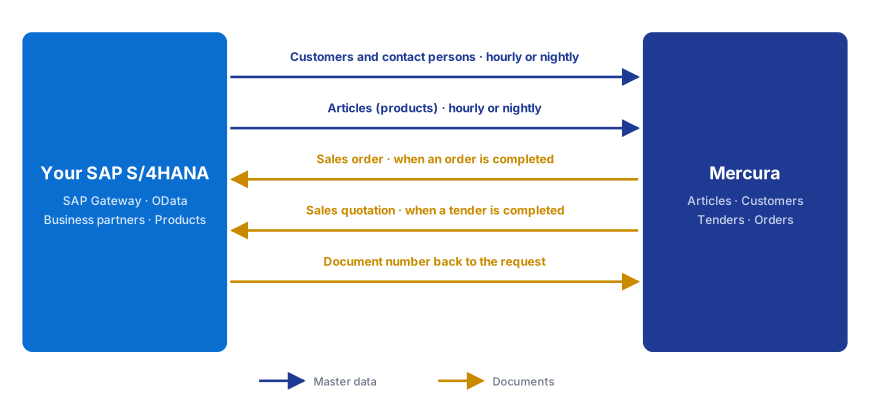
| Data flow | Direction | SAP service | Trigger | Result |
|---|---|---|---|---|
| Customers | SAP → Mercura | API_BUSINESS_PARTNER | Schedule: hourly or nightly | Business partners with a customer record become Mercura customers |
| Contact persons | SAP → Mercura | API_BUSINESS_PARTNER | Schedule: hourly or nightly | The customers' contact persons become Mercura contacts |
| Articles | SAP → Mercura | API_PRODUCT_SRV | Schedule: hourly or nightly | Products become Mercura articles |
| Sales orders | Mercura → SAP | API_SALES_ORDER_SRV | Order completed in Mercura | Sales order in SAP; its number is stored in Mercura |
| Sales quotations | Mercura → SAP | API_SALES_QUOTATION_SRV | Tender completed in Mercura | Sales quotation in SAP; its number is stored in Mercura |
Which system leads which data. SAP leads customers, contact persons and products. Mercura reads them and does not change them. The positions of a request, the article matching and the order capture happen in Mercura. The sales order or quotation Mercura creates is an ordinary SAP document; pricing, availability checks and further processing stay in SAP.
- Standard APIs. Mercura uses SAP's released OData v2 APIs from the SAP Business Accelerator Hub, the same in every S/4HANA system. Your own fields (
YY1_…,ZZ1_…) are supported as long as they are added to these APIs. - Authentication. Mercura signs in at SAP Gateway with the technical user's name and password (Basic authentication) and, before it writes, fetches the CSRF token SAP requires. Mercura stores the password encrypted and never shows it again.
- Pulls. On the schedule you choose, Mercura reads what changed since the last pull, and everything once a week. Business partners record their change date as a day, so Mercura reads the day of the last pull again; changes to an address or a customer record alone do not change it and are caught by the weekly pull. The first pull reads everything.
- Documents. When an order or a tender is completed in Mercura, Mercura creates the sales order or sales quotation in one call and stores the SAP document number it gets back. The number is shown on the request and can link to the document in SAP Fiori.
- Network. Mercura calls SAP Gateway over HTTPS from the internet. If your system is only reachable internally, publish the OData services through a reverse proxy or SAP Web Dispatcher. If your firewall admits only known addresses, ask your Mercura contact for Mercura's outbound IP addresses.
- Certificate. If SAP Gateway uses a certificate of an internal or self-signed CA, Mercura shows its SHA-256 fingerprint on the connection, and you trust exactly this certificate after comparing it with your IT. If the server later presents another certificate, Mercura pauses the connection and sends nothing until you check and trust the new one.