Mercura connects directly to your Salesforce org: customers and contacts, requests and orders come in from Salesforce, and status, quotes and opportunities go back. Like the other chapters under Ready-made connections, this is not an endpoint of the Mercura API. Mercura calls Salesforce, and Salesforce never calls Mercura.
There is no package to install in Salesforce. You create an External Client App and an integration user in your org. Everything else is configured in Mercura under Settings → Integrations → Salesforce. Each data flow has its own switch there, so you can start with one part and add more later.
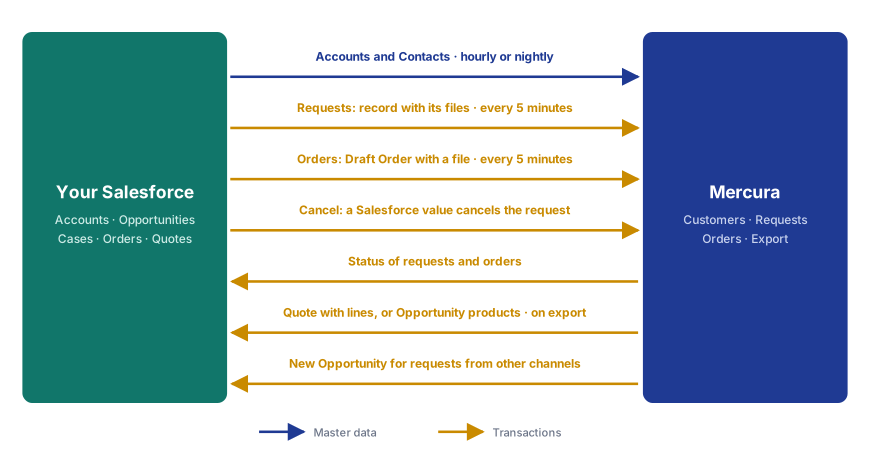
| Data flow | Direction | Trigger | Result |
|---|---|---|---|
| Customers and Contacts | Salesforce → Mercura | Schedule: hourly or nightly | Accounts become Mercura customers, their Contacts become contact persons |
| Requests | Salesforce → Mercura | Rule matched or send flag ticked | New request with the record's files; link written back to Salesforce |
| Status to Salesforce | Mercura → Salesforce | Request status changes | Value in a field of the record, e.g. the stage |
| Cancel from Salesforce | Salesforce → Mercura | Record gets a cancel value | Request cancelled in Mercura |
| Quote to Salesforce | Mercura → Salesforce | Request exported in Mercura | Quote with lines, or Opportunity products |
| Opportunities for other requests | Mercura → Salesforce | Export of a request from e-mail or another channel | Quote under an existing or new Opportunity of the customer |
| Orders from Salesforce | Salesforce → Mercura | Draft Order matches the rule or send flag ticked | Mercura order; order status written back until the Order is activated |
Which system leads which data. Salesforce leads customers, contacts, products and prices. Mercura reads them and does not change them. The positions of a request, the article matching and the order capture happen in Mercura. Pricing, approval and sending of the quote stay in Salesforce. Mercura writes only to the fields and objects you name in the configuration.
- Authentication. Mercura signs in to your External Client App with OAuth 2.0 (client credentials flow). Salesforce runs every call as the app's Run-As user, so Mercura sees and writes exactly what that user may. There is no interactive login and no refresh token. Mercura stores the consumer secret encrypted.
- Polling. Every five minutes Mercura checks through the Salesforce REST API which records have changed. Only records that change after a data flow is switched on are taken in; Mercura does not import older records retroactively.
- No credentials in Salesforce. No Mercura key is stored in your org, and no Mercura triggers or scheduled jobs run there.
- Sandbox and production. A sandbox is connected the same way; its My Domain URL contains
.sandbox. We recommend connecting a sandbox to a Mercura test organisation first.